Hi everyone,
With yesterday's creation of this section, alongside Debian, RISC OS, and Ubuntu, we have a great opportunity to introduce AROS to the Raspberry Pi community and share what makes it worth testing on 64-bit Raspberry Pi hardware.
What is AROS?
![Image]()
AROS is an open-source, lightweight operating system that has been actively developed for over 30 years. It is engineered to be API- and source-compatible with AmigaOS 3.x (with many extensions from 3.9 and 4.x). It is not Linux with an Amiga desktop theme—it is a standalone operating system inspired by classic Amiga architecture, designed to bring the responsiveness, minimal overhead, and distinct software paradigm of the platform to modern hardware.
![Image]()
Like RISC OS, AROS offers an experience fundamentally different from Unix-like systems:
Near-instant boot times straight into the desktop (Intuition/Wanderer).
Extremely low memory footprint—the whole core OS operates in a fraction of the RAM required by modern systems.
Direct, single-user architecture—low latency and minimal background service overhead, paired with classic design characteristics (single address space, no process-level memory protection).
![Image]()
Current Status: Hardware vs. Software (No Hype)
To set realistic expectations upfront: AROS is an enthusiast and hobbyist operating system, not a replacement for Raspberry Pi OS or Ubuntu for everyday web browsing or container workloads.
Hardware Support: On bare-metal Raspberry Pi hardware, support is fully implemented across Raspberry Pi 3, 4 / 400, and 5 / 500 / 500+. Video output, USB input, and core SoC peripherals work out-of-the-box on these platforms.
Software Ecosystem: The current frontier is the software catalog rather than board drivers. Modern heavyweight browsers and complex toolchains are absent, and porting contemporary software takes effort.
The 68k Question on AArch64: Seamless backwards compatibility with legacy Motorola 68k software is essential for the Amiga ecosystem, but it is not yet available natively on AROS AArch64. Projects like Macaros (hosted AROS on macOS AArch64 with a 68k JIT) demonstrate that this integration is viable, and native solutions remain an active goal on the roadmap. For now, the focus is squarely on running and compiling native AArch64 software.
Getting Started: Testing piAROS
Official core development and raw nightly builds are tracked at https://aros.org.
For a ready-to-test setup, a quasi-distribution based on the October 6, 2026 nightly build has been packaged as a standard archive:
Download Archive: https://archive.org/details/piAROS
Official Project Site: https://aros.org
How to Install (No Flashing Required):
You do not need (nor can you use) disk-imaging utilities like Raspberry Pi Imager or balenaEtcher. AROS boots directly from a standard FAT filesystem:
Format a spare microSD card as FAT32 (or standard FAT).
Download piAROS.zip and extract its contents directly into the root folder of the microSD card.
Pop the card into your Raspberry Pi and power on.
Quick Tip for Amiga Newcomers: Where are my files?
If you come from Linux, Windows, or macOS, the Wanderer desktop might surprise you at first:
The .info convention: In Amiga-like systems, folders (drawers) and executable programs are only visible in the graphical desktop by default if they have a matching .info file (which stores their icon and metadata).
If a drawer looks empty: It doesn't mean there are no files inside!
How to see everything: Hold down the Right Mouse Button to access the top menu bar, go to Window → Show → All Files (or use the window context menu). You will then see every file and directory listed, even those without desktop icons. Alternatively, you can open a Shell to explore via the command line.
How You Can Help
Because this subforum is brand new, real-world community feedback across different setups is hugely valuable:
Which supported Pi model and display setup are you running?
Did your specific peripherals (USB hubs, mice, keyboards) behave as expected?
Which native applications or workflows have you tried, and what software gaps did you run into?
Feel free to post your boot results, experiences, or questions below. Welcome to the AROS corner of the Pi forums!
With yesterday's creation of this section, alongside Debian, RISC OS, and Ubuntu, we have a great opportunity to introduce AROS to the Raspberry Pi community and share what makes it worth testing on 64-bit Raspberry Pi hardware.
What is AROS?
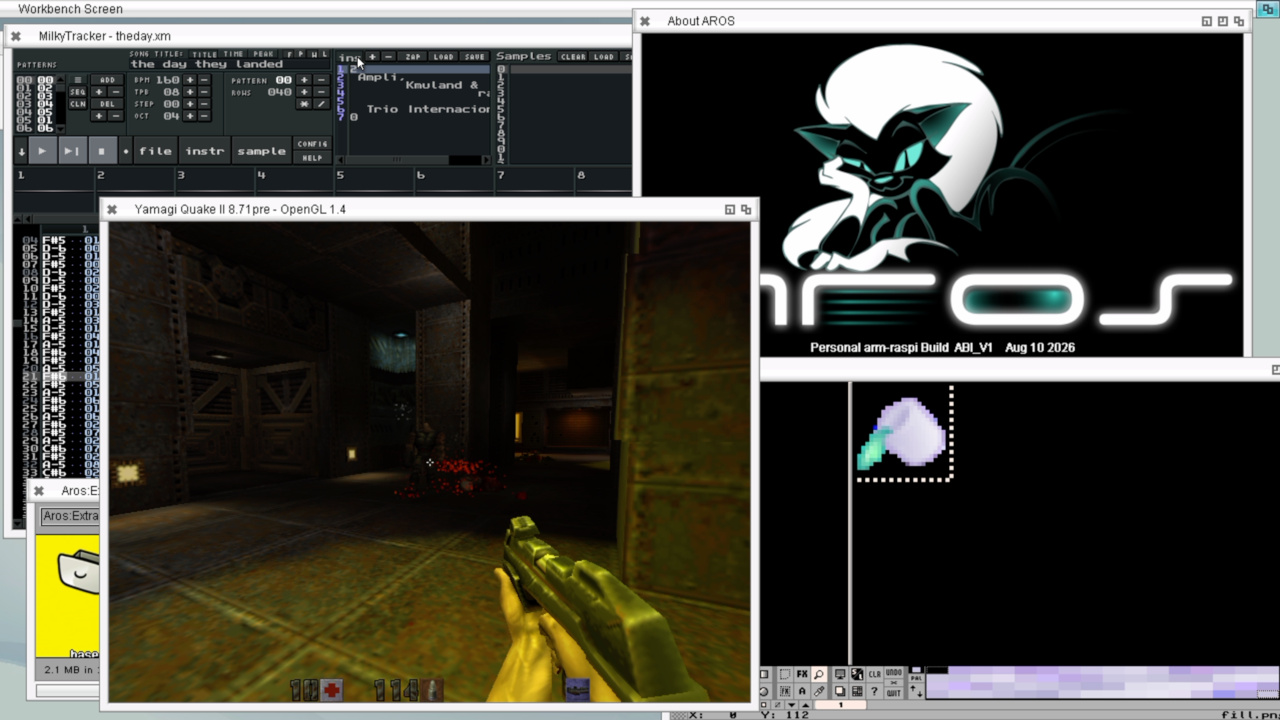
AROS is an open-source, lightweight operating system that has been actively developed for over 30 years. It is engineered to be API- and source-compatible with AmigaOS 3.x (with many extensions from 3.9 and 4.x). It is not Linux with an Amiga desktop theme—it is a standalone operating system inspired by classic Amiga architecture, designed to bring the responsiveness, minimal overhead, and distinct software paradigm of the platform to modern hardware.
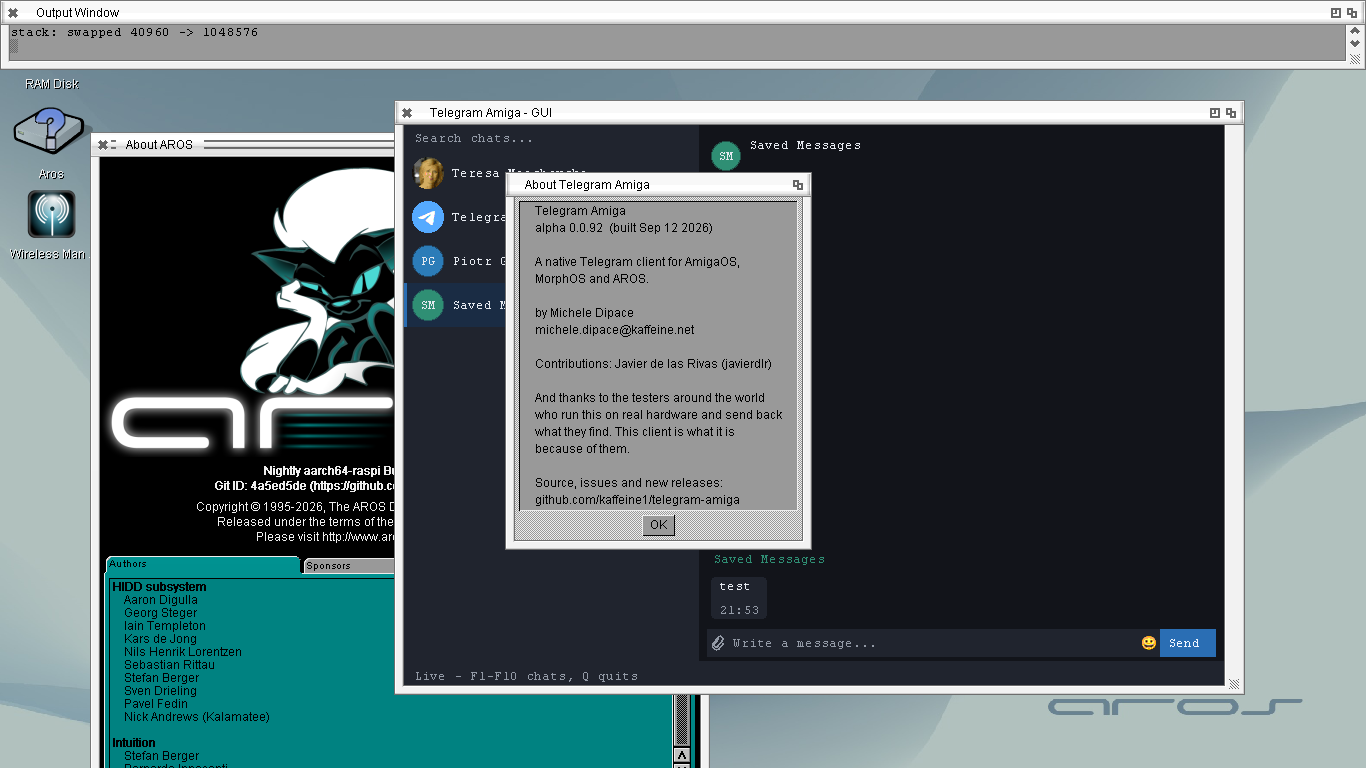
Like RISC OS, AROS offers an experience fundamentally different from Unix-like systems:
Near-instant boot times straight into the desktop (Intuition/Wanderer).
Extremely low memory footprint—the whole core OS operates in a fraction of the RAM required by modern systems.
Direct, single-user architecture—low latency and minimal background service overhead, paired with classic design characteristics (single address space, no process-level memory protection).

Current Status: Hardware vs. Software (No Hype)
To set realistic expectations upfront: AROS is an enthusiast and hobbyist operating system, not a replacement for Raspberry Pi OS or Ubuntu for everyday web browsing or container workloads.
Hardware Support: On bare-metal Raspberry Pi hardware, support is fully implemented across Raspberry Pi 3, 4 / 400, and 5 / 500 / 500+. Video output, USB input, and core SoC peripherals work out-of-the-box on these platforms.
Software Ecosystem: The current frontier is the software catalog rather than board drivers. Modern heavyweight browsers and complex toolchains are absent, and porting contemporary software takes effort.
The 68k Question on AArch64: Seamless backwards compatibility with legacy Motorola 68k software is essential for the Amiga ecosystem, but it is not yet available natively on AROS AArch64. Projects like Macaros (hosted AROS on macOS AArch64 with a 68k JIT) demonstrate that this integration is viable, and native solutions remain an active goal on the roadmap. For now, the focus is squarely on running and compiling native AArch64 software.
Getting Started: Testing piAROS
Official core development and raw nightly builds are tracked at https://aros.org.
For a ready-to-test setup, a quasi-distribution based on the October 6, 2026 nightly build has been packaged as a standard archive:
Download Archive: https://archive.org/details/piAROS
Official Project Site: https://aros.org
How to Install (No Flashing Required):
You do not need (nor can you use) disk-imaging utilities like Raspberry Pi Imager or balenaEtcher. AROS boots directly from a standard FAT filesystem:
Format a spare microSD card as FAT32 (or standard FAT).
Download piAROS.zip and extract its contents directly into the root folder of the microSD card.
Pop the card into your Raspberry Pi and power on.
Quick Tip for Amiga Newcomers: Where are my files?
If you come from Linux, Windows, or macOS, the Wanderer desktop might surprise you at first:
The .info convention: In Amiga-like systems, folders (drawers) and executable programs are only visible in the graphical desktop by default if they have a matching .info file (which stores their icon and metadata).
If a drawer looks empty: It doesn't mean there are no files inside!
How to see everything: Hold down the Right Mouse Button to access the top menu bar, go to Window → Show → All Files (or use the window context menu). You will then see every file and directory listed, even those without desktop icons. Alternatively, you can open a Shell to explore via the command line.
How You Can Help
Because this subforum is brand new, real-world community feedback across different setups is hugely valuable:
Which supported Pi model and display setup are you running?
Did your specific peripherals (USB hubs, mice, keyboards) behave as expected?
Which native applications or workflows have you tried, and what software gaps did you run into?
Feel free to post your boot results, experiences, or questions below. Welcome to the AROS corner of the Pi forums!
Statistics: Posted by Bohun — Thu Oct 08, 2026 3:14 pm — Replies 2 — Views 44
![[QLD, NSW, VIC] Samsung 65](http://files.ozbargain.com.au/n/31/978831l.jpg?h=8d64f0c6)